Showing posts with label Javascript. Show all posts

Tuesday, March 6, 2012

JavaScript Anonymous functions


Usually we declare function in JavaScript as like
        function sum(a, b) {
            return a + b;
        }

This is the regular practice of defining functions.
Beside there are enhanced capabilities of JavaScript which helps to override functions, define static functions, adding methods or members to an object and prototype, etc…
The same above function can be declared as

var sum = function (a, b) {
            return a + b;
        }
Here  “sum” is the anonymous function object.
The above anonymous object can be send as a an argument to a function to invoke.
Ex:-
var sum = function (a, b) {
            return a + b;
        }

        function testSum(f1, a, b) {
            return f1(a, b);
        }
//sending function object and function arguments
alert(testSum(sum, 8, 10));

Another example of anonymous :-
Ex:-
    var fun2 = {
            "prop1": "hi",
            "met1": function (a, b) { return a + b; }
        };

alert(fun2.met1(4, 5));
alert(fun2.prop1);
This is just like static  members which doesn’t require instance to be created to access members.

Ex:-
var fun3 = function () {
            this.met1 = function (a, b) { c = a + b; };
            this.c = 0;
            this.met2 = function () { alert(c); };
            this.toString = function () { alert("value is " + c); };
        }

var objFun3 = new fun3();
objFun3.met1(8, 10);
objFun3.met2();
objFun3.toString();

To add a new function to fun3,
fun3.prototype.met4 = function () {
                alert('function 4');
            }

Or
fun3.prototype = { "met4": function () { alert("fun4 method 4"); } };

Ex:- Adding a new function to object (objFun3)
objFun3.met3 = function () {
                alert("object method 3");
            }
Adding new function of object will not add to the class (function – fun3) prototype.
So a new instance or another instance of “fun3” other than “objFun3”, will not be able to invoke “met3”.

Overriding a function in object (objFun3)
ex:-
objFun3.met1 = function (a, b) { return a - b; };
When the method (met1) is invoked using “objFun3” only then the above function will be invoked, otherwise for a different instance the (met1) method in “fun3” prototype is invoked.

Adding Static members,
Ex:-
fun3.met3 = function () { alert("fun3 method 3 1"); };

The static members are added to function (fun3) but not to the prototype.
Hence the static member can be invoked without creating instance to the function (fun3)

Monday, March 5, 2012

Implementing Inheritance in JavaScript


Below example explains to build functions in a class and also implementing the inheritance.

if (typeof Test == 'undefined')
    Test = {};

Test.namespace = function (nmspace) {
    var nms = nmspace.split(".");
    var obj = Test;
    for (i = 0; i < nms.length; i++) {
        obj[nms[i]] = (obj[nms[i]]) ? obj[nms[i]] : {};
        obj = obj[nms[i]];
    }
}
Test.namespace("App.UI");

The above lines would help in creating namespaces and there after the functions are defined under specific namespace.

Test.App.UI.Base = function () {
    alert('parent class constructor');
}


Test.App.UI.Base.prototype.setInnerText = function (id, txt) {
    document.getElementById(id).innerText = txt;
}

Above functions are in class “Base” which falls in “Test.App.UI” namespace.


var objTest;

function LoadTest() {
    objTest = new Test.App.UI.Test();
}
Test.App.UI.Test = function () {
    Test.App.UI.Test.superclass.constructor.call(this, Test.App.UI.Base);
}

//calling below function will apply the iheritance
Test.extend(Test.App.UI.Test, Test.App.UI.Base);
Test.App.UI.Test.prototype.Hello = function () {
    alert(“hello”)
}

Test.App.UI.Test.prototype.SetValue = function (val) {
    objTest.setInnerText('lbl', resp.value);
}


Above functions are in“Test” class which also falls in “Test.App.UI” namespace.


Test.extend = function (subclass, superclass) {
    var fun = function () { };
    fun.prototype = superclass.prototype;
    subclass.prototype = new fun();
    subclass.prototype.constructor = subclass;
    subclass.superclass = superclass.prototype;
}


Test.extend function is used to apply the inheritance for the given two classes.

Wednesday, February 1, 2012

Freeze Row and Header of a HTML Table

This post helps to freeze the header row and first column of a HTML table using java script.

Below is the sample html page

<!DOCTYPE html PUBLIC "-//W3C//DTD XHTML 1.0 Transitional//EN" "http://www.w3.org/TR/xhtml1/DTD/xhtml1-transitional.dtd">
<html xmlns="http://www.w3.org/1999/xhtml">
<head id="Head1" runat="server">
<title></title>
<style type="text/css">
/* Div container to wrap the datagrid */
div#div-datagrid
{
height: 200px;
overflow: auto;
}
</style>
<script type="text/javascript">
function freeze() {
freezeRow1Col1('tbl', 'tblRow1Col1', 'tr_header');
freezeColumnHeader('tbl', 'tblColumnHeader', 'tr_header');
freezeRowHeader('tbl', 'tblRowHeader', 'tr_header');

}
function freezeRow1Col1(srctbl, desttbl, trhdrid) {
var tbl1 = document.getElementById(srctbl);
var tbh1 = document.getElementById(desttbl);
var tr1 = document.getElementById(trhdrid);
var pr = tbl1.parentNode;
var newTr = document.createElement("tr");
var newTd = document.createElement("td");
if (tr1 == null) return;
var td = tr1.childNodes(0);
for (j = 0; j < td.attributes.length; j++)
if (td.attributes(j).value != "null" && td.attributes(j).value != "") {
if (td.attributes(j).name.toUpperCase() == "NOWRAP" || td.attributes(j).value.toUpperCase() == "FALSE")
continue;
newTd.setAttribute(td.attributes(j).name, td.attributes(j).value);
newTd.width = td.style.width;
newTd.height = (td.clientHeight - 2) + 'px';
newTd.innerHTML = td.innerHTML;
}
newTr.appendChild(newTd);
tblRow1Col1.childNodes(0).appendChild(newTr);
td.parentNode.removeChild(td);
}
function freezeRowHeader(srctbl, desttbl, trhdrid) {
var tbl1 = document.getElementById(srctbl);
var tbh1 = document.getElementById(desttbl);
var tr1 = document.getElementById(trhdrid);
tbh1.parentNode.style.width = tbl1.parentNode.clientWidth + 'px';
if (tr1==null)return;
var newTr = document.createElement("tr");
for (i = 0; i < tr1.childNodes.length; i++) {
var newTd = document.createElement("td");
var td = tr1.childNodes(i);
for (j = 0; j < td.attributes.length; j++)
if (td.attributes(j).value != "null" && td.attributes(j).value != "") {
if (td.attributes(j).name.toUpperCase() == "NOWRAP" || td.attributes(j).value.toUpperCase() == "FALSE")
continue;
newTd.setAttribute(td.attributes(j).name, td.attributes(j).value);
}
newTd.style.width = td.style.width;
newTd.innerHTML = td.innerHTML;
newTr.appendChild(newTd);
}
tbh1.childNodes(0).appendChild(newTr);
tr1.parentNode.removeChild(tr1);
}

function freezeColumnHeader(srctbl, desttbl, trhdrid) {
var tbl1 = document.getElementById(srctbl);
var tbh1 = document.getElementById(desttbl);
var pr = tbl1.parentNode;
var trs = tbl1.getElementsByTagName("tr");
for (i = 0; i < trs.length; i++) {
if (trs[i].id == trhdrid)
continue;
var newTr = document.createElement("tr");
var newTd = document.createElement("td");
var td = trs[i].getElementsByTagName("td")[0];
for (j = 0; j < td.attributes.length; j++)
if (td.attributes(j).value != "null" && td.attributes(j).value != "") {
if (td.attributes(j).name.toUpperCase() == "NOWRAP" || td.attributes(j).value.toUpperCase() == "FALSE")
continue;
newTd.setAttribute(td.attributes(j).name, td.attributes(j).value);
}
newTd.style.width = td.style.width;
newTd.innerHTML = td.innerHTML;
newTr.appendChild(newTd);
tbh1.childNodes(0).appendChild(newTr);
td.parentNode.removeChild(td);
tbh1.parentNode.style.height = tbl1.parentNode.clientHeight + 'px';
}
}
function rowHeaderScroll(obj) {
document.getElementById('div1').scrollLeft = obj.scrollLeft;
document.getElementById('div1').scrollTop = obj.scrollTop;
document.getElementById('div2').scrollLeft = obj.scrollLeft;
document.getElementById('div2').scrollTop = obj.scrollTop;
}
</script>
</head>
<body>
<form id="form1" runat="server">

<input type="button" name="btnFreeze" value="Freeze" onclick="freeze();" />
<table>
<tr>
<td>
<div id="div3" style="overflow: hidden;">

<table id="tblRow1Col1" border="1">
</table>
</div>
</td>
<td>
<div id="div1" style="overflow: hidden;" >

<table id="tblRowHeader" border="1" style="table-layout: fixed;" >
</table>
</div>
</td>
</tr>
<tr>
<td style="vertical-align: top">
<div id="div2" style="overflow: hidden">

<table id="tblColumnHeader" border="1">
</table>
</div>
</td>
<td>
<!--Note width specified in this below tag (800px) is used while calculating. changing this value will reflect in UI -->

<div id="div-datagrid" onscroll="rowHeaderScroll(this);" style="width:400px;">

<table id="tbl" border="1" style="table-layout: fixed;">
<tr id="tr_header">
<td style="width:100px">
Row1 Col1
</td>
<td style="width:100px">
Header 1
</td>
<td style="width:100px">
Header 2
</td>
<td style="width:100px">
Header 3
</td>
<td style="width:75px">
Header 4
</td>
<td style="width:75px">
Header 5
</td>
<td style="width:75px">
Header 6
</td>
<td style="width:75px">
Header 7
</td>
<td style="width:75px">
Header 8
</td>
</tr>
<tr>
<td style="width:100px">
Rec 1
</td>
<td style="width:100px">
Last Name
</td>
<td style="width:100px">
Address 1
</td>
<td style="width:100px">
Address 2
</td>
<td style="width:75px">
City
</td>
<td style="width:75px">
State
</td>
<td style="width:75px">
Zip Code
</td>
<td style="width:75px">
Phone
</td>
<td style="width:75px">
Email
</td>
</tr>
<tr>
<td >
Rec 2
</td>
<td >
Last Name
</td>
<td >
Address 1
</td>
<td >
Address 2
</td>
<td >
City
</td>
<td >
State
</td>
<td >
Zip Code
</td>
<td >
Phone
</td>
<td >
Email
</td>
</tr>
<tr>
<td >
Rec 3
</td>
<td >
Last Name
</td>
<td >
Address 1
</td>
<td >
Address 2
</td>
<td >
City
</td>
<td >
State
</td>
<td >
Zip Code
</td>
<td >
Phone
</td>
<td >
Email
</td>
</tr>
<tr>
<td >
Rec 4
</td>
<td >
Last Name
</td>
<td >
Address 1
</td>
<td >
Address 2
</td>
<td >
City
</td>
<td >
State
</td>
<td >
Zip Code
</td>
<td >
Phone
</td>
<td >
Email
</td>
</tr>
<tr>
<td >
Rec 5
</td>
<td >
Last Name
</td>
<td >
Address 1
</td>
<td >
Address 2
</td>
<td >
City
</td>
<td >
State
</td>
<td >
Zip Code
</td>
<td >
Phone
</td>
<td >
Email
</td>
</tr>
<tr>
<td >
Rec 6
</td>
<td >
Last Name
</td>
<td >
Address 1
</td>
<td >
Address 2
</td>
<td >
City
</td>
<td >
State
</td>
<td >
Zip Code
</td>
<td >
Phone
</td>
<td >
Email
</td>
</tr>
<tr>
<td >
Rec 7
</td>
<td >
Last Name
</td>
<td >
Address 1
</td>
<td >
Address 2
</td>
<td >
City
</td>
<td >
State
</td>
<td >
Zip Code
</td>
<td >
Phone
</td>
<td >
Email
</td>
</tr>
<tr>
<td >
Rec 8
</td>
<td >
Last Name
</td>
<td >
Address 1
</td>
<td >
Address 2
</td>
<td >
City
</td>
<td >
State
</td>
<td >
Zip Code
</td>
<td >
Phone
</td>
<td >
Email
</td>
</tr>
</table>
</div>
</td>
</tr>
</table>
</form>
</body>
</html>


Row1 Col1 Header 1 Header 2 Header 3 Header 4 Header 5 Header 6 Header 7 Header 8
Rec 1 Last Name Address 1 Address 2 City State Zip Code Phone Email
Rec 2 Last Name Address 1 Address 2 City State Zip Code Phone Email
Rec 3 Last Name Address 1 Address 2 City State Zip Code Phone Email
Rec 4 Last Name Address 1 Address 2 City State Zip Code Phone Email
Rec 5 Last Name Address 1 Address 2 City State Zip Code Phone Email
Rec 6 Last Name Address 1 Address 2 City State Zip Code Phone Email
Rec 7 Last Name Address 1 Address 2 City State Zip Code Phone Email
Rec 8 Last Name Address 1 Address 2 City State Zip Code Phone Email

Monday, January 9, 2012

Browser Close Event - Javascript

Below is the sample html + java script source which helps to understand regarding how to fire the browser close event.
Beside below way of handling there is an another way. We can use use the body unload event and then in the unload event we will check the cursor position if it is near to window close button which mean user has tried to click on close button.
But this will not work if user says Alt+F4 or closes from task bar directly.

Scenario, like say if app should update database as logged out when user closes the browser.
This can be handled by calling a web page using XmlHttp request in the below "WindowClose" function.


<%@ Page Language="C#" AutoEventWireup="true" CodeFile="Test.aspx.cs" Inherits="Test" %>

<!DOCTYPE html PUBLIC "-//W3C//DTD XHTML 1.0 Transitional//EN" "http://www.w3.org/TR/xhtml1/DTD/xhtml1-transitional.dtd">

<html xmlns="http://www.w3.org/1999/xhtml">
<head runat="server">
<title></title>
<script type="text/javascript" language="javascript">

function WindowClose(event) {
event = event || window.event;

var confirmClose = "This is to fire the close event of browser";

if (event) {
event.returnValue = confirmClose;
}
return confirmClose;
}
window.onbeforeunload = WindowClose;
</script>
</head>
<body>
<form id="form1" runat="server">
<div>

</div>
</form>
</body>
</html>

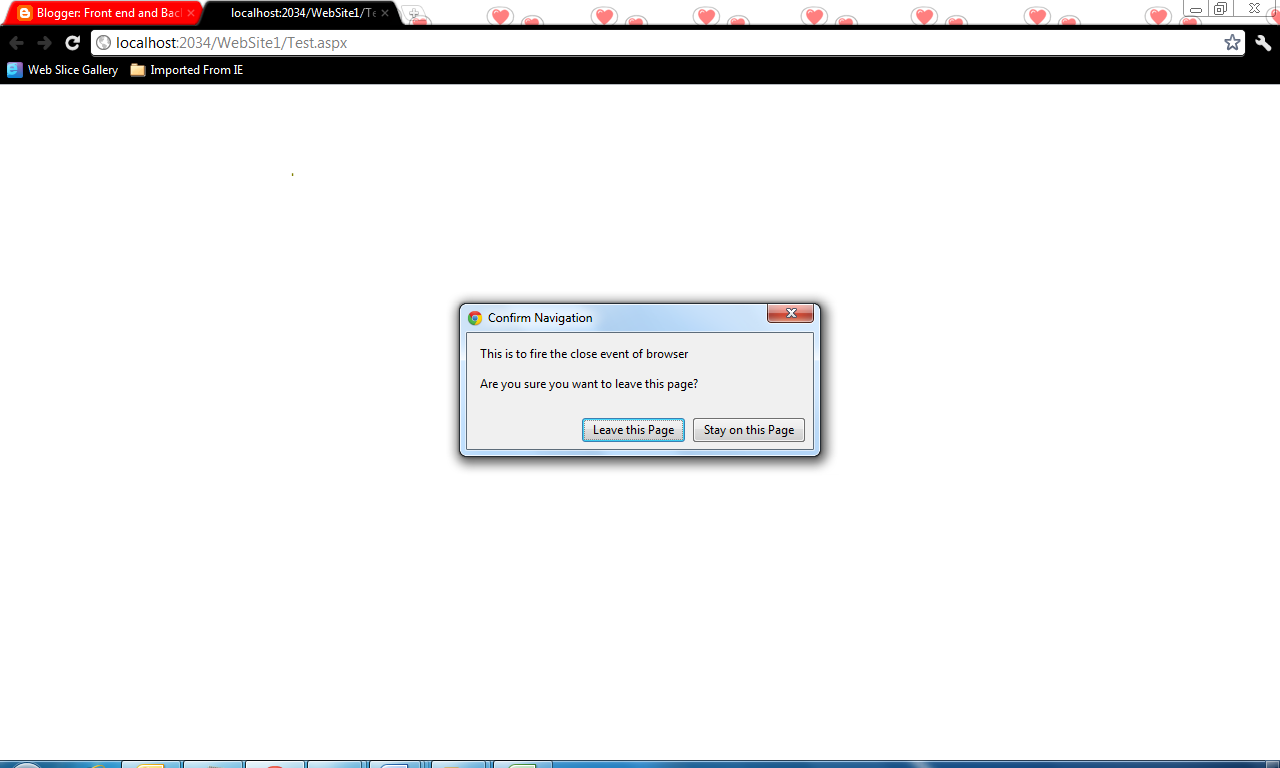
After running the above ones and while trying to close the browser, dialog appears as per below screen shot.

The same applies for Firefox and IE Browser

Tuesday, March 24, 2009

How to draw rectangles from a given graph removing the common vertical lines using JavaScript.

Please refer
Draw line using third party java script file

As explained in above post that the third party java script file makes our task very easier to draw objects.
Now by using this java script file, I would like to share my HTML page and java script code to generate below.
Output:


Note : This is a basic HTML page, so it is not specific to technology
Input :-
User enters number of rectangles in input text box and clicks on “Generate rectangles”, to generate random rectangles.
It should generate mentioned number of rectangles with random height and width but base lined bottoms (similar to a graph).


When user clicks on “Generate button” giving number of input rectangles as 10.


Now output: When user clicks on “Generate Output”, we should draw those rectangles as shown below.


Removing the vertical lines between rectangles to display as union but at last the area of all these output rectangles should be same as are of all input rectangles.
Note:
If you would like to copy the below HTML page to run, Make sure that the third party graphics JavaScript file is downloaded into your machine and placed in this application folder where you are creating this HTML page.
Down third party JavaScript file by clicking here
wz_jsgraphics.zip download
HTML File :

<!DOCTYPE html PUBLIC "-//W3C//DTD XHTML 1.0 Transitional//EN" "http://www.w3.org/TR/xhtml1/DTD/xhtml1-transitional.dtd">
<html xmlns="http://www.w3.org/1999/xhtml" >
<head>
<title>Rectangles</title>
<link rel="stylesheet" type="text/css" href="Styles/Stylesheet.css" />
</head>
<body>
<div id="Canvas" style="position:relative;height:5px;width:5px;"></div>
<script type="text/javascript" language="javascript" src="wz_jsgraphics.js"></script>
<script type="text/javascript" language="javascript">
var jg = new jsGraphics("Canvas"); // Use the "Canvas" div for drawing
</script>
<script type="text/javascript" language="javascript">
var orgX=50;
var orgY=200;
var minWdth=20;
var minHght=30;
var maxWdth=60;
var maxHght=120;
var rndFactor=10;
var opShft=150;
var lnCntr=0;
var tmr=50;
var iprects=null;
var oprects=null;
var argCnt;
var inpCntr=0;
var rects=new Array();
var ipTmr=50;
var optmr=50;
var recCntr=0;
function rect()
{
var width;
var height;
var id;
var x1;
var y1;
}
function generaterectangles_clk()
{
var txtRec=document.getElementById('txtRects');
if(txtRec.value=='')
{
alert('Please enter number of rectangles to generate');
txtRec.focus();
return;
}
if(!IsNumber(txtRec.value))
{
alert('Please enter numeric value');
txtRec.focus();
return;
}
var numRects=txtRec.value;
if(numRects<3 || numRects>30)
{
alert('Number of rectangles to generate should be between 3 and 30');
txtRec.focus();
return;
}
orgX=50;
orgY=400;
argCnt=numRects;
inpCntr=0;
rects=new Array();
GenerateRects();
}

function GenerateRects()
{
inpCntr++;
if(inpCntr<=argCnt)
{
var rand_no;
var recWth,recHgt;
rand_no = Math.random();
recWth=Math.floor(minWdth+(maxWdth-minWdth)*rand_no);
recHgt=Math.floor(minHght+(maxHght-minHght)*rand_no);
var objRect=new rect();
objRect.width=recWth;
objRect.height=recHgt;
objRect.id=(inpCntr);
rects[rects.length]=objRect;
DefineRects(rects);
setTimeout('GenerateRects();',ipTmr);
}
else
{
var divdisp=document.getElementById('div_recIndx');
divdisp.style.display='none';
divdisp.innerText='';
}
}
function dispRecIndex(x1,y1,txt)
{
var divdisp=document.getElementById('div_recIndx');
divdisp.style.display='block';
divdisp.innerText=txt;
divdisp.style.left=x1;
divdisp.style.top=y1;
}
function DefineRects(argRects)
{
jg.clear();
var x1=orgX;
var y1=orgY;
var buf=5;
var crd=findPosition(document.getElementById('div_map'));
var maxY=crd[1]-buf;
var maxX=document.getElementById('div_map').offsetWidth+crd[0]-buf;
var minY=crd[1]-document.getElementById('div_map').offsetHeight;
var minX=crd[0];
var objRect=new rect();
for(i=0;i<argRects.length;i++)
{
objRect=argRects[i];
if(x1<maxX && x1>minX)
{
objRect.x1=x1;
objRect.y1=y1;
x1+=objRect.width;
}
else
{
for(j=i;j<argRects.length;j++)
argRects[j]=null;
break;
}
if(y1<maxY && y1>minY)
{
objRect.y1=maxY;
}
argRects[i]=objRect;
}
iprects=argRects;
for(i=0;i<argRects.length;i++)
{
if(argRects[i]==null)
break;
objRect=argRects[i];
var xc=new Array();
var yc=new Array();
xc[0]=objRect.x1;
yc[0]=objRect.y1;
xc[1]=objRect.x1+objRect.width;
yc[1]=objRect.y1;
xc[2]=objRect.x1+objRect.width;
yc[2]=objRect.y1-objRect.height;
xc[3]=objRect.x1;
yc[3]=objRect.y1-objRect.height;
xc[4]=objRect.x1;
yc[4]=objRect.y1;
clr=clr1;
dispRecIndex((xc[0]+xc[1])/2,(yc[0]+yc[2])/2,(i+1));
drawRect(xc,yc);
}
}


function generateoutput_clk()
{
if(iprects==null)
return;
var argRects=new Array();
for(i=0;i<iprects.length;i++)
{
if(iprects[i]==null )
break;
var objRect=iprects[i];
var obj=new rect();
obj.x1=objRect.x1;
obj.y1=objRect.y1;
obj.width=objRect.width;
obj.height=objRect.height;
obj.id=objRect.id;
argRects[i]=obj;
}
var prx1,pry1,crx1,cry1;
for(i=0;i<argRects.length;i++)
{
if(argRects[i]==null )
continue;
var currect=argRects[i];
for(var j=i-1;j>=0;j--)
{
if(argRects[j]==null)
continue;
var prvrect=argRects[j];
if(iprects[j].height<=iprects[i].height)
break;
if(prvrect.y1!=currect.y1)
continue;
if(iprects[j].height==iprects[i].height && j==i-1)
{
currect.width=currect.width+iprects[j].width;
iprects[j]=null;
argRects[j]=null;
continue;
}
currect.x1=prvrect.x1;
currect.y1=prvrect.y1;
currect.width=currect.width+prvrect.width;
if(prvrect.y1-prvrect.height<=currect.y1-currect.height)
{
prvrect.y1=currect.y1-currect.height;
prvrect.height=prvrect.height-currect.height;
}
argRects[i]=currect;
}
for(var j=i+1;j<argRects.length;j++)
{
if(argRects[j]==null)
continue;
var nxtrect=argRects[j];
if(nxtrect.y1!=currect.y1)
continue;
if(iprects[j].height<iprects[i].height)
break;
if(iprects[j].height==iprects[i].height && j==i+1)
{
currect.width=currect.width+iprects[j].width;
iprects[j]=null;
argRects[j]=null;
continue;
}
currect.width=currect.width+iprects[j].width;
if(nxtrect.y1-nxtrect.height<=currect.y1-currect.height)
{
nxtrect.y1=currect.y1-currect.height;
nxtrect.height=nxtrect.height-currect.height;
}
argRects[i]=currect;

}
}

oprects=argRects;
recCntr=0;
drawOp();
}
function drawOp()
{
var argRects=oprects;
if(oprects==null)
return;
var i=recCntr;
if(argRects[i]!=null)
{
objRect=argRects[i];
var xc=new Array();
var yc=new Array();
xc[0]=objRect.x1;
yc[0]=objRect.y1+opShft;
xc[1]=objRect.x1+objRect.width;
yc[1]=objRect.y1+opShft;
xc[2]=objRect.x1+objRect.width;
yc[2]=objRect.y1-objRect.height+opShft;
xc[3]=objRect.x1;
yc[3]=objRect.y1-objRect.height+opShft;
xc[4]=objRect.x1;
yc[4]=objRect.y1+opShft;
clr=clr1;
drawRect(xc,yc);
dispRecIndex((xc[0]+xc[1])/2,(yc[0]+yc[2])/2,(i+1));
}
else
{
var divdisp=document.getElementById('div_recIndx');
divdisp.style.display='none';
divdisp.innerText='';
}
recCntr++;
if(recCntr<=argRects.length)
setTimeout('drawOp();',optmr);
}
</script>

<script type="text/javascript" language="javascript">
function IsNumber(argText)
{
var nums='0123456789';
for(i=0;i<argText.length;i++)
{
if(nums.indexOf(argText.charAt(i))==-1)
return false;
}
return true;
}

var clr="red";
var clr1='red';
var clr2='green';
var clr3='blue';
var strk=2;
function drawRect(xc,yc)
{
jg.setStroke(strk);
jg.setColor(clr);
jg.drawPolygon(xc,yc);
jg.paint();
}

function findPosition(element)
{
var left = 0;
var top = 0;

if (element != null)
{
while (element.offsetParent)
{
left += element.offsetLeft;
if (element.offsetParent.scrollLeft) {left -= element.offsetParent.scrollLeft; }
top += element.offsetTop;
if (element.offsetParent.scrollTop) { top -= element.offsetParent.scrollTop; }
element = element.offsetParent;
}
left += element.offsetLeft + document.body.scrollLeft - document.body.clientLeft + 7;
top += element.offsetTop + document.body.scrollTop - document.body.clientTop;
}

return [left,top];
}

</script>
<script type="text/javascript" language="javascript">
function DisplayText(argText)
{
var obj=document.getElementById('div_map');
var divdwn=document.getElementById('div_download');
divdwn.style.display='block';
divdwn.innerText=argText;
var crd=findPosition(obj);
divdwn.style.left=crd[0];
divdwn.style.top=crd[1]+40;
document.getElementById('btnDisp').style.display='block';
}
</script>


<table id="maintable" style="width:800px;">
<tr class="tr_header">
<td style="width:40%;text-align:right;">Number of Input Rectangles :</td><td><input type="text" id="txtRects" /> 
</td>
</tr>
<tr>
<td class="tr_header" style="text-align:center;" colspan="2">
<input type="button" value="Generate Rectangles" class="cssbutton" style="width:200px" onclick="generaterectangles_clk();"/>
<input type="button" value="Generate Output" class="cssbutton" style="width:200px;" onclick="generateoutput_clk();"/>
 
</td>

</tr>
<tr>
<td colspan="2">
 <br />
<div id="div_map" style="width:800px;height:600px;border: 3px solid #ccc; " >

</div>
</td></tr>
</table>
<div id="div_download" class="div_down" style="position:absolute;height:500;display:none"></div>
<div id="div_recIndx" style="position:absolute;height:50;display:none"></div>
</body>
</html>

Auto amount format using java script

I would like to share my java script function that validates user input while entering amount in a specific amount field text box.
Things to validate
1) Is it always positive amount?
2) Should not allow user to enter characters other than (0123456789-.).
3) Should not allow user to type “.”, if value in text box already has “.”.
4) Should not allow user to type “-”, if value in text box already has “-”.
5) Should insert “-“at zero (0) index when user types “-“at index other than zero.


HTML Page:
<!DOCTYPE html PUBLIC "-//W3C//DTD XHTML 1.0 Transitional//EN" "http://www.w3.org/TR/xhtml1/DTD/xhtml1-transitional.dtd">
<html xmlns="http://www.w3.org/1999/xhtml" >
<head>
<title>Untitled Page</title>
<script type="text/javascript" language="javascript">
//list of characters that are to be allowed for a valid double value (either positive or negative)
var PosDoubleChars=".0123456789";
var NegDoubleChars="-.0123456789";
//function that add's events to the given text box control to handle it for amount validations
function AmountControl(obj,msg,blnNeg)
{
//Checking if textbox control should allow negative or positive double values
if(blnNeg)
AllowNegDouble(obj);
else
AllowPosDouble(obj);
//setting on focus out event to automatically format given input anount
obj.onfocusout=function(){ValidateAmount(obj,msg,blnNeg);};
}

function AllowNegDouble(obj)
{
AllowChars(obj,NegDoubleChars);
}

function AllowPosDouble(obj)
{
AllowChars(obj,PosDoubleChars);
}

function AllowChars(obj,argChrs)
{
//adding key press evet to restrict user from entering characters other than mentioned list
//of double characters
obj.onkeypress=function(){return CheckChar(obj,event.keyCode,argChrs);}
}

//checking the character code to allow it.

function CheckChar(obj,kyCd,argChrs)
{
if(argChrs==PosDoubleChars)
{
if(kyCd>=46 && kyCd<=58 )
{
if(kyCd==47)
{
return false;
}
if(kyCd==46)
{
for(var i=0;i<obj.value.length;i++)
{
if(obj.value.charAt(i)=='.')
{
return false;
}
}
}
return true;

}
return false;
}
if(argChrs==NegDoubleChars)
{
if((kyCd>=46 && kyCd<=58) || (kyCd==45))
{
if(kyCd==47)
{
return false;
}
if(kyCd==45)
{
if(obj.value.indexOf('-')!=-1)
{
return false;
}
else
{
obj.value='-'+obj.value;
return false;
}
}
if(kyCd==46)
{
for(var i=0;i<obj.value.length;i++)
{
if(obj.value.charAt(i)=='.')
{
return false;
}
}
}
return true;

}
return false;
}
}

//validating and fomratting amount
function ValidateAmount(obj,msg,blnNeg)
{
obj.value=replaceAll(obj.value,',','');
var amtval=obj.value;
if(amtval=='')
return true;
var numb=obj.value.substr(0,obj.value.indexOf('.'));
if(numb.length<=16)
obj.value=FormatAmount(parseFloat(obj.value).toFixed(4));
if(obj.value=="NaN")
obj.value="0.00";
return true;
}
//to replace specific character with speific character in given input string
function replaceAll(wrd,frm,to)
{
var Char;
var fnl='';
for (i = 0; i < wrd.length ; i++)
{
if (wrd.charAt(i)==frm)
{
fnl+=to;
}
else
fnl+=wrd.charAt(i);
}
return fnl;
}
//auto formatting
function FormatAmount(nStr)
{
nStr += '';
x = nStr.split('.');
x1 = x[0];
x2 = x.length > 1 ? '.' + x[1] : '';
var rgx = /(\d+)(\d{3})/;
while (rgx.test(x1)) {
x1 = x1.replace(rgx, '$1' + ',' + '$2');
}
return x1 + x2;
}
</script>
</head>
<body>
Amount : <input type="text" id="txtAmount" />
<script>
//I am calling the above created function saying ‘txtAmount’ as amount control //that should handle all above validations.
//It should allow negative decimals as I said true
AmountControl(document.getElementById('txtAmount'),'Please enter valid amount',true);
</script>
</body>

</html>
UI :


Intput:


1) It it allowing me to enter negative value but if once"-" is typed in middle it is automatically getting inserted at beginning and not allowing to type “-“ again if the amount is already negative.
2) It is allowing me to type "." But if amount is already having decimal it is not allowing to type “." again if the amount is already negative.

3) Not allowing me to type characters other than specified (0123456789-.).

4) Automatically formatting amount by rounding off to 4 decimals if user focuses out from the amount text box.
Output: